
Build AWS architecture diagrams from code, automatically
The AI you already use generates architecture diagrams from Terraform, CloudFormation and more.
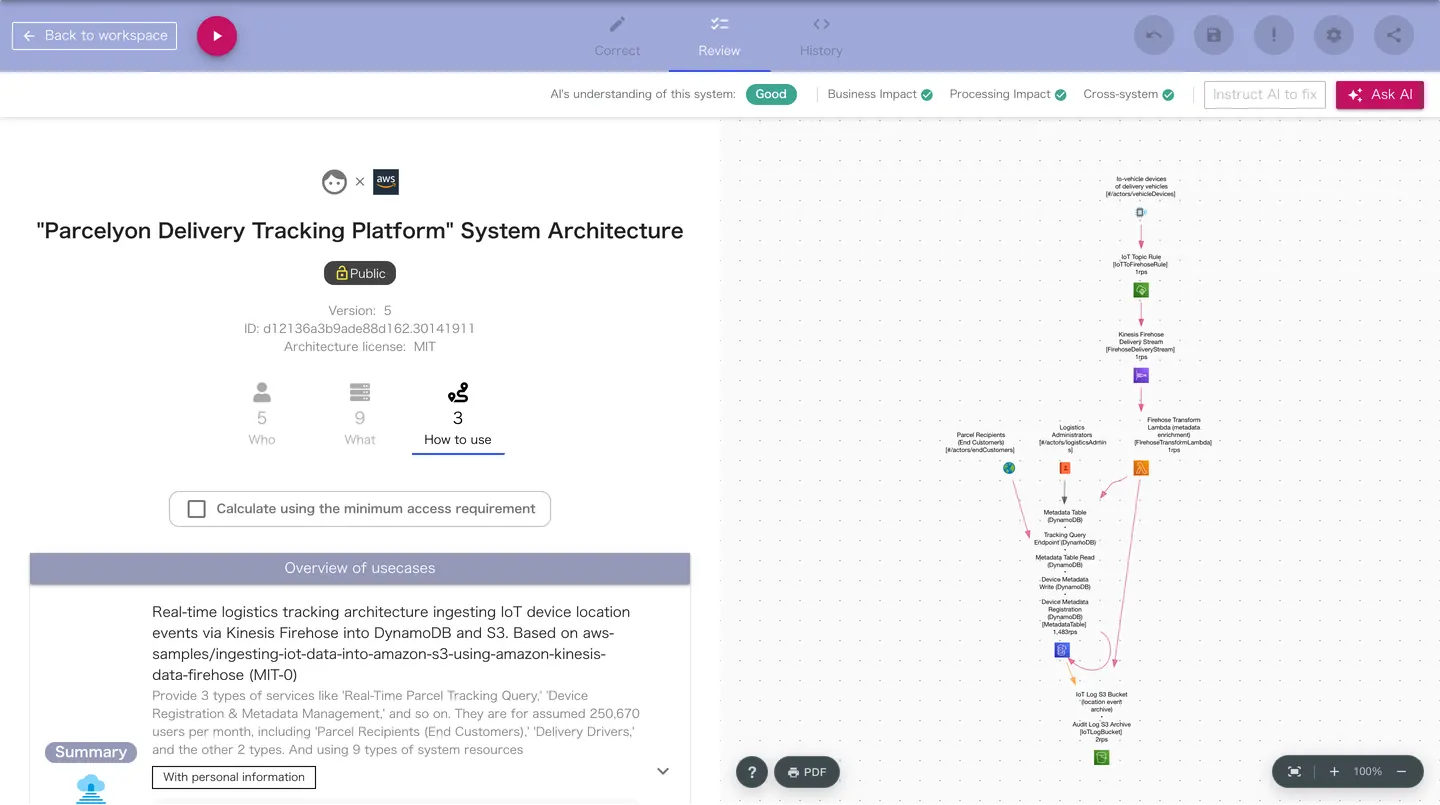
Diagrams show more than system resources
On top of the resources in your infrastructure-as-code files, IceShore draws what the system does for the business: its use cases.
Use cases
Who uses which resources, and for what. Each use case shows what the system does for the business.
External systems
Shows how the system connects to external services such as payments, email and delivery platforms.
How it works
Safe data handling
The AI you already use reads and organizes your code. IceShore never calls an AI to build diagrams or make decisions.
A clear view of what is sent
After you log in, the History tab shows exactly what data was sent to IceShore for rendering.
Open data format
Diagram data is written in ADL (Architecture Description Language). The spec is public.
Secret masking
Values that look like access keys or passwords are masked before saving, wherever they can be detected.
Multilingual
From the same architecture, IceShore draws one diagram in Japanese and another in English.
Break the processing flow down by business task and trace it
Select a use case in IceShore and the related users and resources are highlighted, so you can follow the processing flow step by step.
You can also export diagrams as PDF.
Public samples
Architecture diagrams built from public infrastructure code. You can open them without signing up.
Agent chatbot with Strands Agents and Amazon Bedrock AgentCore
Open diagram→Serverlesspresso: coffee ordering system for event venues
Open diagram→Order service of a serverless e-commerce platform
Open diagram→Routing events to an SQS queue with EventBridge rules
Open diagram→Three-tier Todo web app (Cloud Run + Memorystore + Cloud SQL)
Open diagram→HTTP API on Azure Functions (Consumption plan)
Open diagram→
Why IceShore instead of draw.io?
Use cases built in
draw.io is great for free-form drawing. IceShore is built to show how business tasks relate to system resources.
People and AI read it the same way
draw.io gives you the freedom to draw whatever helps people understand. IceShore diagrams follow strict notation rules, so both people and AI can understand the system from them. That is because the diagrams are meant to give information to the AI that does your system maintenance.
What you can do with IceShore
Your AI gets better at system maintenance.
FAQ
Does it cost anything?
Free for one person, with no time limit. Teams pay per seat per month (Team $19, Business $39, excl. tax). Team and Business come with a 14-day free trial.
Which files can it read?
Infrastructure-as-code files such as Terraform, CloudFormation and serverless.yml, plus source code. Your own AI does the reading.
Is my code sent to IceShore?
IceShore stores the architecture data (ADL) and the infrastructure-as-code files the ADL references. Values that look like access keys or passwords are masked before saving.
What do I do when the architecture changes?
Ask your AI to “update the architecture diagram.” The same diagram is replaced with the new content, and the change history is kept.
Can I try it without signing up?
Public samples open without signing up. You can also ask your AI questions about the samples.
Bind your AI-grown systems, with AI.
Start maintaining your systems with IceShore today.