
Write your “system architecture diagram” as code, not as a drawing
https://iceshore.ai/en/blog/a-p3-1/
On this page
- Architecture diagrams matter
- When people draw diagrams, three things happen
- That is why there are efforts to generate diagrams from code
- IceShore aims beyond accuracy
- With the business link in place, people and AI can both trace the impact
- When you hand maintenance to AI, this link helps
- What is ADL?
- See it for yourself
Generate architecture diagrams from code. IceShore is a new take on that idea
Architecture diagrams matter
When you need to understand a system you have just inherited, the first thing you probably open is its architecture diagram. Where the entry points are, which path a request takes, and where the data ends up: what would take pages to read as prose sinks in quickly from a single diagram.
An architecture diagram says so much because it makes relationships visible as shapes. Just by following the boxes and the lines between them, you can see which way the dependencies run and how deep they go. Prose cannot match that speed.
When people draw diagrams, three things happen
First, how readable a diagram is depends on who drew it. For the same system, a different person arranges the boxes differently and picks a different level of detail. It is not unusual for someone who inherits a predecessor's diagram to start by redrawing it their own way.
Second, complex wiring leads to misreadings. The more elements there are, the more the lines cross. The more they cross, the harder it is to follow where each line goes, and misreadings creep in.
Third, the diagram falls behind the code. The architecture changes with every deployment, but the diagram gets fixed only when someone happens to notice. There is no guarantee that the diagram you open six months later matches what is running today.
That is why there are efforts to generate diagrams from code
Whoever generates it gets the same diagram, and when the code changes, the diagram changes too. Several tools already take this approach.
| Tool | What it generates from |
|---|---|
terraform graph | Outputs a dependency graph in DOT format from Terraform definitions |
| TerraVision | Draws architecture diagrams from Terraform code |
| InfraMap | Draws architecture diagrams from Terraform code or state files |
| cdk-dia | Generates diagrams from the synthesized output of AWS CDK |
Other tools let you write the diagram itself as text. PlantUML, Diagrams, and Structurizr are examples, and they let you put diagram definitions under version control. With these, however, the diagram is not derived from your infrastructure definitions. When you change the infrastructure, the diagram stays the same until someone rewrites the definition.
We agree with the approach of generating diagrams from code. IceShore is one form of it.
IceShore aims beyond accuracy
A diagram generated from code is accurate about structure. Which resource calls which can be determined by reading the definition files.
Some things, though, cannot be read from them: what the system does for the business (its use cases).
Nowhere in the code does it say, “If this path stops, the front desk's booking work stops.” The code tells you only which endpoint hits which database. The link to the business is usually buried in someone's head, in incomplete documents, and in meeting notes.
So IceShore generates architecture diagrams using ADL (Architecture Description Language), a definition language for adding that link to the business.
ADL describes who (actors) uses what (resources) and how (use cases). Resources are expressed by having ADL reference your existing provisioning code (Terraform, CloudFormation, Azure Resource Manager, Google Cloud Deployment Manager, Alibaba Cloud ROS, and Serverless Framework). There is no wasted effort copying that structure from scratch. The structure keeps coming from the very files that built what is running now. What ADL adds is the use cases on top.
With the business link in place, people and AI can both trace the impact
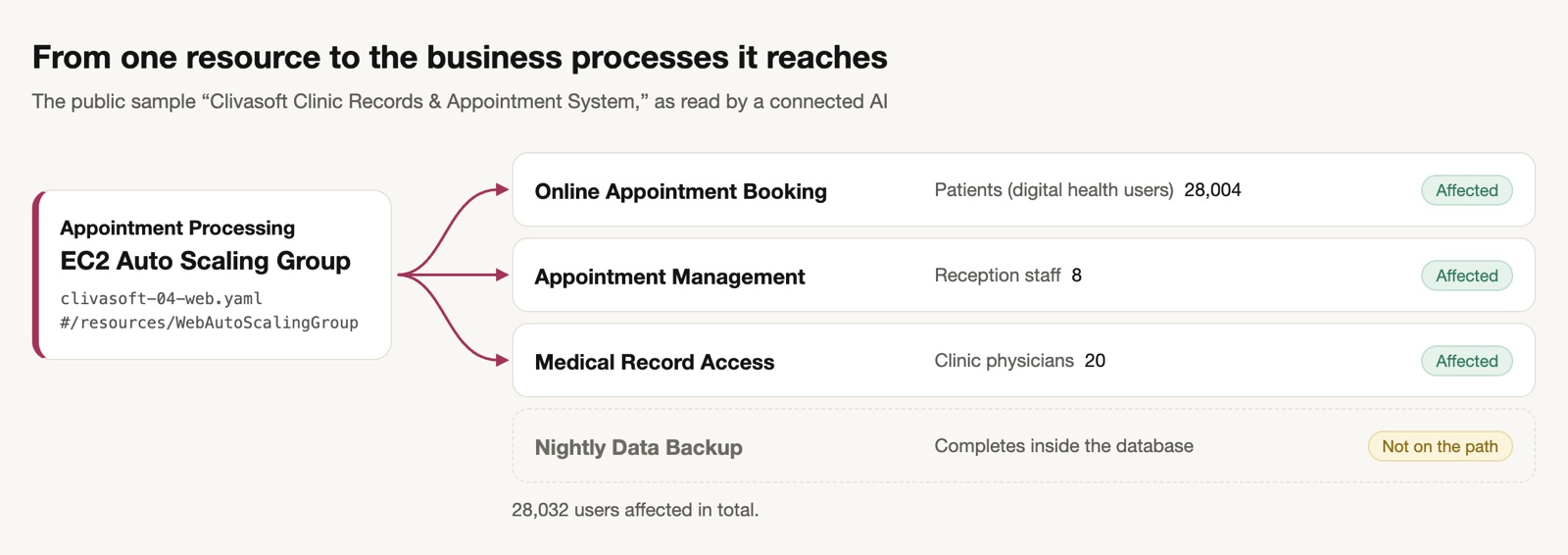
When the diagram carries the link to the business, you can answer “Who would be affected if we stopped this database?” just by following the diagram. Trace the path that would stop back to its start, and the business process and the people affected line up.
The AI you already use can do the same. Because the diagram and the business links are stored in a form AI can read, an AI connected to IceShore can answer by reference rather than by guesswork.
When you hand maintenance to AI, this link helps
Generative AI has made development faster, and the number of systems you look after is growing. Maintaining all those extra systems takes the help of AI.
Giving that AI only your existing code is not enough. Existing code tells it the structure, but the use cases are not written there. The more maintenance you hand to AI, the more you need to give it information about how systems relate to the business, which existing code cannot fully convey.
What is ADL?
IceShore stores architectures in a text format called ADL (Architecture Description Language). Reindeer Technology Pte. Ltd. publishes the language specification and schema under the Apache License 2.0.
Layout is automatic
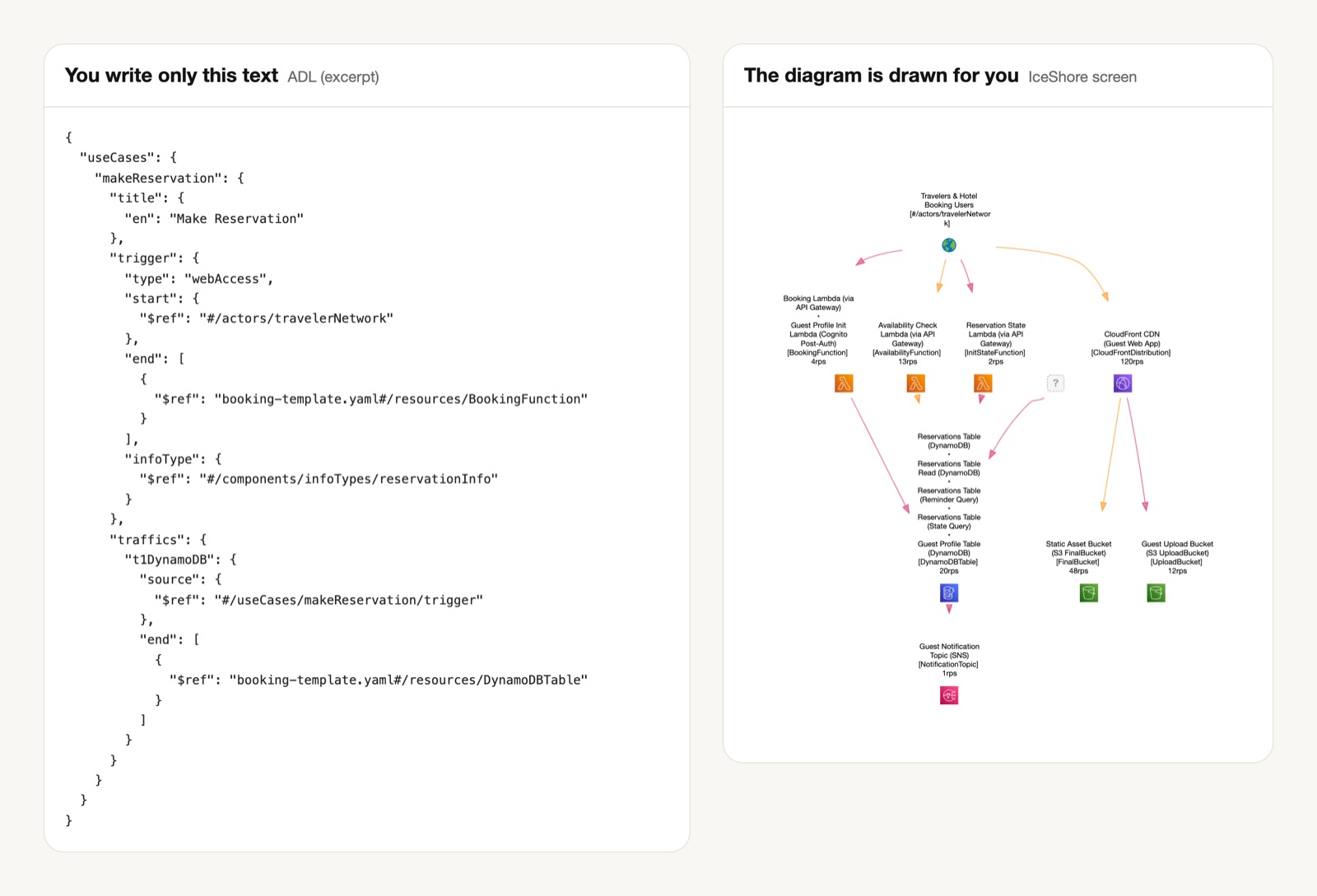
In ADL you write only elements and relationships. There is no field for coordinates. A rendering algorithm decides the layout.
That means the diagram never looks different depending on who drew it, and no one has to untangle crossing lines by hand. The time-consuming work that drawing tools demand never comes up.
An ADL document requires six declarations
The six required declarations are reindeer, self, info, actors, resources, and useCases. (reindeer is the version of the ADL specification itself; in the public samples at the time of writing, it is “2.0.0”.)
References have a fixed form, so AI can follow them
Connections between elements are expressed as string references. For example, use case A (web browsing) starts with a request from actor X (a guest) and ends by saving data to resource P (a database).
Because the form is fixed, AI can write code that follows the references. The end points are arrays of references, so you can tally which traffic ends at which resource.
Use cases are a required field
This is what sets ADL apart from tools that describe only system structure. None of the tools listed above require a field for what a resource does for the business. In ADL, leave that field out and the file is not valid.
When you connect the AI you already use to IceShore, IceShore guides it so it can write ADL from your existing documents. That way you can complete your ADL without much effort.
Note that what your AI writes is a projection of how it understands the system. When you correct it, your AI's understanding of the system deepens as well.
Data sensitivity is a required pair of booleans
An infoType definition requires two booleans, confidential and privacy. Each path references this definition, and where data is stored, storedInfoType is specified separately.
So you can list the paths that carry personal data, and the places where that data is stored, by following two references. The list people used to rebuild for every security review can be pulled from the architecture.
Changes can be reviewed line by line
Because ADL is text, changes show up as line diffs. Put exported ADL in a repository, and you can review architecture changes with the same process you use for existing code.
With a drawing-tool file, you cannot tell what changed until you open both versions and compare them. With ADL, you see only the lines that changed.
The ADL specification is public, so you can build it into your own tools
The definition schema consists of two files: ja/reindeer-schema_cds.json and en/reindeer-schema_cds.json. Their required fields are identical; only the language of the descriptions differs.
Under the Apache License 2.0, you are free to build ADL into internal tools or to read and write it from another service. No contract with IceShore is required.
https://github.com/reindeer-project/ArchitectureDescriptionLanguage
See it for yourself
The sample architectures open without signing up.
https://app.iceshore.ai/workspace/sample/
Connect the AI you already use and ask it, “If we stopped the medical-records database, who would be affected?” Your AI follows the chain of references described in this article to answer.