
AutoGPT Platform architecture diagram (unofficial)
This is an unofficial overview made by Launchers Co., Ltd., the company behind the configuration-management platform IceShore, by reading the project’s source code with AI. It is not affiliated with or reviewed by the AutoGPT maintainers.
AutoGPT Platform is the software in the Significant-Gravitas/AutoGPT repository on GitHub. With it, you can hand work to AI agents (Otto and Experts), or build AI workflows visually and run them. This page uses an architecture diagram of the whole platform to show which services connect to which when it runs under Docker Compose. To keep this page short, it focuses on the main use case of the 19, "Running a workflow". You can see the flows of the other use cases in IceShore's public sample.
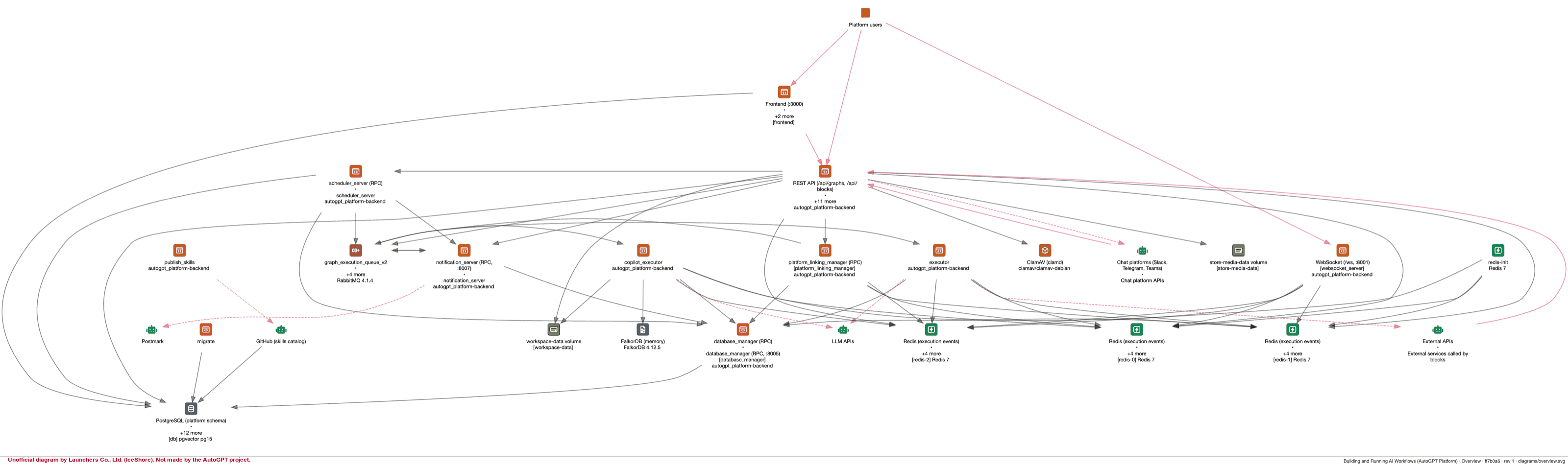
The overall architecture
These are the main services.
| Service | Role |
|---|---|
| frontend | The screens users work in (port 3000) |
| rest_server | The REST API: saving workflows, accepting runs, file uploads and more (port 8006) |
| websocket_server | Sends run progress to the browser (port 8001) |
| executor | Runs the building blocks of a workflow (blocks) along their connections |
| copilot_executor | Runs Otto, the chat assistant (called copilot in the code) |
| scheduler_server | Starts workflows on schedule |
| notification_server | Sends alert, briefing and other notification emails |
| database_manager | Reads and writes PostgreSQL on behalf of the executor, the scheduler, notifications and others (rest_server and the frontend's sign-in access the database directly) |
| platform_linking_manager | On behalf of chat-platform bots (Slack, Telegram, Teams and others), looks up linked accounts and starts conversations with Otto (runs only when the Compose "bot" profile is enabled) |
Data is stored and exchanged through PostgreSQL (pgvector), a three-node Redis cluster, RabbitMQ and FalkorDB. Uploaded files are scanned for viruses with ClamAV.
The core use case: what happens when a workflow runs
You can see the flows of the other 18 use cases in the public sample, linked from the section "See the flows of the other use cases" below. When a user clicks the run button, the run proceeds as follows. The numbers match the numbers on the lines in the diagram, and step 10 happens right after step 3.
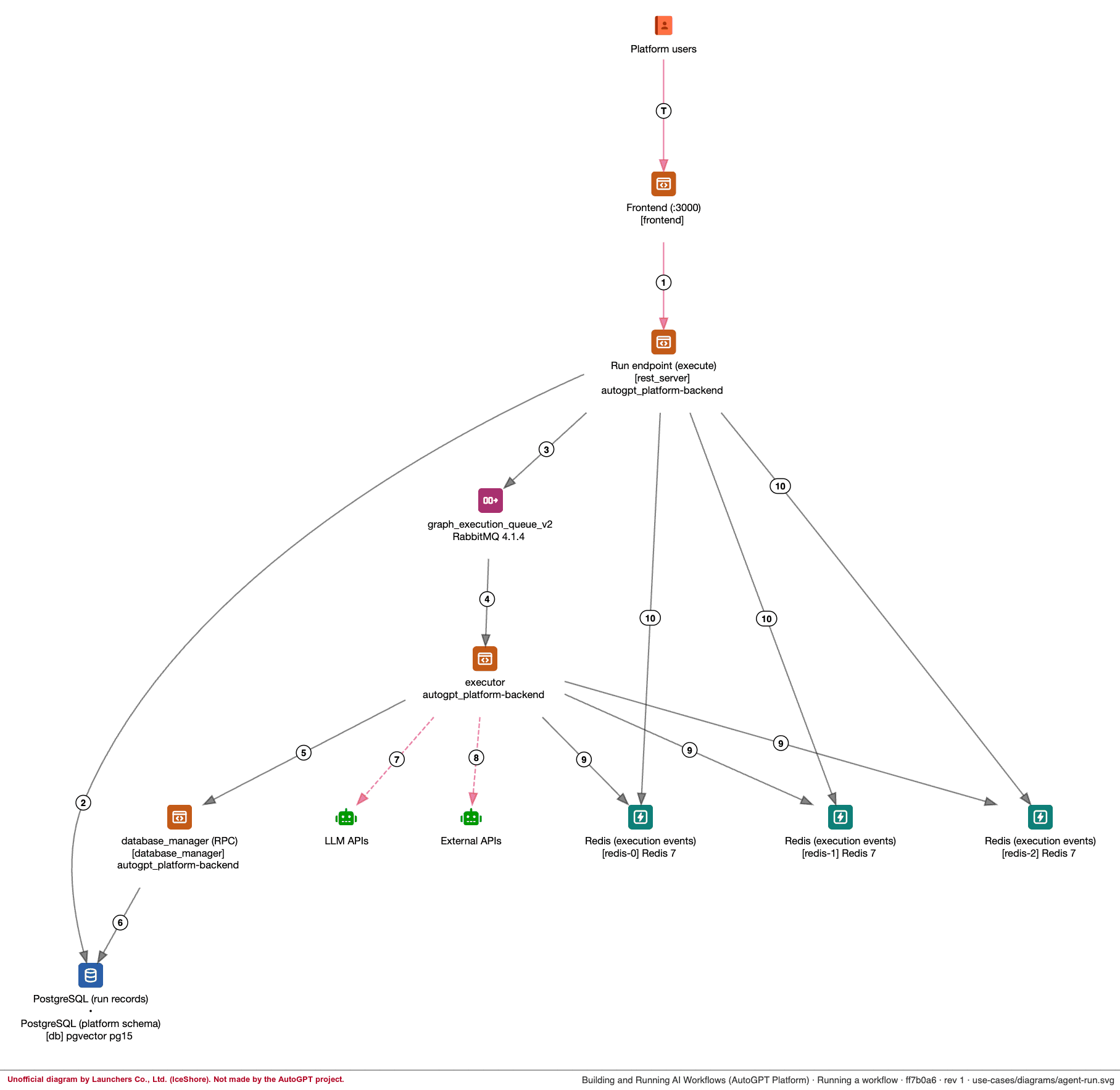
- The frontend passes the request on to rest_server's execution API. When an outside program calls the API directly with an API key, the frontend is not involved.
- rest_server creates a run record in PostgreSQL. For runs started from the screen, it first checks the user's credit balance.
- rest_server puts the run on a RabbitMQ queue (graph_execution_queue_v2).
- The executor takes the run off the queue and runs the blocks, following the connections between them. A block runs as soon as its inputs are ready, so several blocks can run at the same time.
- The executor reads and writes each block's inputs, outputs and status through database_manager.
- database_manager reads and writes PostgreSQL.
- LLM blocks call external LLM APIs.
- Integration blocks call the APIs of external services.
- The executor publishes changes in the status of the run and each block to Redis. websocket_server picks them up there and updates the screen.
- Right after putting the run on the queue, rest_server publishes its first status (QUEUED) to Redis.
See the flows of the other use cases
The diagram covers the following 19 use cases. IceShore's public sample opens without signing in. Select a use case and the diagram shows only the services it passes through, in order. You can also see the source files the diagram is based on.
- Building and editing workflows in the builder
- Running a workflow
- Live run updates in the browser
- Setting up a run schedule
- Scheduled workflow runs
- Cancelling a run
- Workflow runs started by integration webhooks
- Chatting with Otto
- Using Otto from chat platforms
- Linking a chat account
- File upload with virus scanning
- Uploading images and videos for store listings
- Sending alert mail
- Sending briefing mail
- Sign-up confirmation, password reset and other account emails
- Event notification emails (store review results, trial and subscription notices)
- Startup: database schema migration
- Startup: publishing the skills catalog
- Startup: forming the Redis cluster
The use case names are the same as in the public sample.
Public sample: https://app.iceshore.ai/design/d57976af137515f0841.90261952/
What this diagram covers
- The services were read from
autogpt_platform/docker-compose.platform.ymlandautogpt_platform/docker-compose.yml, and the connections between them from the backend and frontend code. We did not run AutoGPT Platform to confirm them. - An AI checked the content against the source code.
- Volumes the application does not use directly (
falkordb_dataandclamav-data), JWT verification at sign-in, and some status events are not shown in the diagram. - The AutoGPT repository changes every day. The commit this page is based on and the date it was last checked are shown at the top of the page.
Diagram your own system
The diagram on this page was made by an AI that read the AutoGPT code and registered the result in IceShore. Connect the AI you already use (Claude Code, Codex and others) to IceShore, and it reads your infrastructure files, such as Terraform, CloudFormation, Docker Compose or Kubernetes manifests, along with your application code, then creates an architecture diagram and use cases in the same format.
It's free for a single user, with no time limit. Pricing for teams is on the pricing page.